


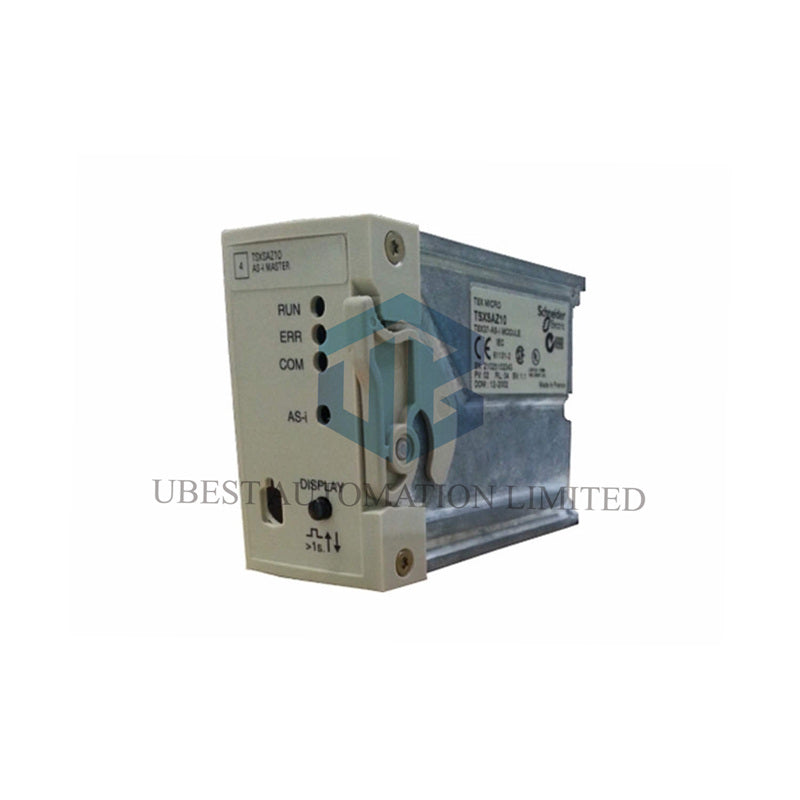
Schneider Electric AS-i Master | 31 Devices TSXSAZ10
UBEST – Vertrauenswürdiger globaler Lieferant für Automatisierungsteile
Wir bieten eine große Auswahl an vorrätigen Ersatzteilen für die industrielle Automatisierung. Alle Produkte haben eine 12-monatige Garantie und eine 30-tägige Rückerstattung bei Qualitätsproblemen.
Schneider Electric Modicon TSXSAZ10 AS-Interface Master Module
The Schneider Electric TSXSAZ10 is an AS-Interface (AS-i) master module for TSX Micro PLC systems. This module connects the PLC to a cost-effective sensor and actuator network. It can manage up to 31 AS-i slave devices on a single network. The TSXSAZ10 also integrates 4 local discrete inputs and 4 outputs for direct I/O connection.
Core Module Specifications
- Brand: Schneider Electric
- Model: TSXSAZ10
- Product Line: Modicon TSX Micro / Premium Automation Platform
- Module Type: AS-Interface (AS-i) Master Module
- AS-i Version: V1.0
- Network Profile: Actuator-Sensor Interface (AS-i), M2 Profile
- Maximum Slave Devices: 31 Devices (with Standard Addressing)
- Local Discrete I/O: 4 Inputs / 4 Outputs
- Addressing Method: Standard AS-i Addressing
- Cabling System: Standard AS-i Unpolarised 2-wire Cable
- Module Net Weight: Approx. 0.45 kg (1.00 lb)
Electrical & Connection Details
- Power Supply: Integrated from the host PLC platform (backplane)
- AS-i Line Connection: Dedicated Terminal Block
- Local I/O Connection: Via the module's integrated terminals
- Electrical Isolation: Between AS-i network and PLC backplane
Environmental & Physical Ratings
- Operating Temperature: 0°C to +60°C (32°F to 140°F)
- Storage Temperature: -25°C to +70°C (-13°F to 158°F)
- Operating Humidity: 5% to 95% RH (non-condensing)
- Ingress Protection (IP): IP20 (for installation inside a control cabinet)
- Vibration Immunity: Complies with IEC 60068-2-6 (Fc tests)
- Shock Immunity: Complies with IEC 60068-2-27 (Ea tests)
Standards & Certifications
- Primary Standard: IEC 61131-2 (Programmable Controllers)
- AS-i Certification: AS-Interface No. 12001
- Network Conformance: Compliant with AS-i V1.0 specification
Installation & Network Setup
- Insert the module into an available slot on a compatible TSX Micro base unit.
- Connect the standard yellow AS-i 2-wire flat cable to the dedicated terminal block.
- Ensure proper polarity if using older polarised AS-i networks (V2.0+).
- Connect the 4 local inputs and outputs to nearby sensors and actuators if needed.
- Address all AS-i slave devices (1-31) using an addressing unit or master programming tool.
- Configure the network in the PLC programming software (Unity Pro/PL7).
- The master automatically detects and parameterizes configured slaves upon power-up.
- Terminate the AS-i line with the specified resistance if the cable length exceeds 100m.
Packaging & Shipping Information
- Package Contents: 1 x TSXSAZ10 AS-i Master Module
- Package Dimensions (L x W x H): 25.5 x 5.7 x 5.5 cm (10.04 x 2.2 x 2.2 in)
- Package Gross Weight: 324 g (11.4 oz)
- Shipping GTIN (EAN): 3389110738070
- Shipping Methods: FedEx, UPS, DHL Express services available.
- Return Policy: This communication module is non-returnable.
Warranty & Support
- Warranty Period: 12 months from the date of purchase.
- Warranty covers defects in materials and manufacturing under normal use.
- Support is available for network configuration and slave device integration.
- Use only AS-i certified power supplies and repeaters for network extensions.
Frequently Asked Questions (FAQ)
- What is AS-Interface typically used for?
AS-i is a simple, low-cost network for connecting binary sensors (e.g., push buttons, limit switches) and actuators (e.g., solenoid valves, pilot lights) to a PLC, reducing wiring time and cost in machine control panels.
- Can I mix different brands of AS-i slaves on the same network?
Yes, AS-i is an open standard. You can use slaves from any manufacturer (Siemens, Festo, IFM, etc.) on the same network as long as they are AS-i certified and you stay within the 31-device limit.
- What are the 4 local I/O points for?
These are for connecting devices that are physically very close to the PLC rack, avoiding the need to run them onto the AS-i network. It's useful for a few critical or high-speed signals right at the controller.
- How do I address a new AS-i slave device?
You need a handheld addressing unit or a configuration tool in the PLC software. The slave is temporarily connected to the addressing tool, which assigns it a unique number (1-31) before it is connected to the live network.
- What is the maximum cable length for an AS-i network?
The total trunk line can be up to 100 meters without a repeater. Using repeaters, you can extend the network up to 300 meters. The yellow flat cable carries both data and power to the slaves.
© 2025 Ubest Automation Limited. All rights reserved.
Original Source: https://www.ubestplc.com/
Contact: sales@ubestplc.com Phone: +86 180 3000 5825